

Guide · AI product engineer
Build a bank voice assistant with Deep Agents and Rasa Mantle
Connect Deep Agents research to a Rasa Mantle voice assistant. Learn how to validate evidence, handle corrections and bind approval to the right card charge.
Key takeaways (3)
- Connect a Deep Agents research worker to a Rasa Mantle conversation.
- Validate research against the selected evidence and reject stale results.
- Bind confirmation to a specific proposal and invalidate it when the charge changes.
A caller asks about an unfamiliar £49 card charge. Your assistant finds the merchant, explains the evidence and offers to ask bank staff to review it. Then, just before confirming, the caller says: “Sorry, I meant the £149 charge.”
What should happen to the request that is already waiting for approval?
This tutorial uses that small correction to explore a larger engineering problem: connecting an agent that researches a task to a conversation that can act on it. You will give a Deep Agents research workflow a Rasa Mantle voice interface, then follow the selected charge all the way from evidence lookup to a confirmed review request.
The example is a local assistant for fictional Jacaranda Bank. Deep Agents reads the evidence for one charge. Mantle conducts the conversation. A Python case service tracks the selected charge and decides whether a proposed review can still be recorded. By the end, you will have run the offline checks, replayed a complete text conversation and, optionally, spoken to the assistant through your microphone.
The central design rule is simple: approval belongs to a particular proposal. A later “yes” must not silently approve a different charge.
Before you start
You should be comfortable reading Python and running terminal commands. You will need Git, Python 3.12, uv and make. The companion project pins an experimental Mantle build, 3.21.0.dev5, and the dependencies used by this example.
You can work through the tutorial in three stages:
| Stage | What you will learn | Credentials needed |
|---|---|---|
| Offline checks | How evidence, selection and approval are checked in code | None |
| Text conversation | How the model calls the tools and handles confirmation | OpenAI key and Rasa Pro licence |
| Voice conversation | How the same workflow behaves with spoken input and output | The above, plus Deepgram and Rime keys |
Start with the offline checks even if voice is your main goal. They let you examine the application behaviour before adding model responses, transcription and speech synthesis.
1. Separate research, conversation and case state
An unfamiliar statement descriptor is a useful starting point because finding the merchant does not settle every question about a payment. The fixture’s ASTER*ANNUAL descriptor points to Aster Reading’s annual membership. That can help a caller recognise a charge. Authorisation requires separate evidence.
The assistant therefore has two possible outcomes. The caller may recognise the charge after hearing the explanation and need nothing further. If they still want staff review, the assistant prepares a proposal and asks them to confirm it.
Three components support that conversation:
| Component | Responsibility | State or output |
|---|---|---|
| Deep Agents worker | Research the evidence supplied for the selected charge | References to evidence in that snapshot |
| Mantle | Explain the findings, handle corrections and ask for confirmation | Conversation and pending tool call |
| Python case service | Track the current selection, prepare proposals and validate submission | Selected charge, proposal and demo receipts |
The case service is the application code behind Mantle’s tools. It is where a selection becomes authoritative and where a review is recorded. The researcher has no submission tool.

- Research follows the selection. The worker receives evidence for the charge the application has selected.
- Submission goes through the case service. The application checks the proposal again when Mantle resumes a confirmed call.
This pattern is useful when you already have a research workflow worth keeping: perhaps it reads several sources or contains domain-specific tools. You expose that workflow through a Mantle tool and let Mantle manage the customer conversation.
The tiny fixtures here could be handled by a Python lookup. They keep the investigation easy to inspect while you learn the integration. A fixed descriptor list, by itself, would not justify adding a research agent.
2. Install the companion project
Start with the runnable example. These commands create a directory called jacaranda-voice and check out the exact revision used by this tutorial. If that directory already exists, choose a different location.
git clone https://github.com/RasaHQ/rasa-community-resources.git jacaranda-voice
cd jacaranda-voice
git checkout --detach e7db3283483f8836f28e540349f359f51c71df6f
python3 scripts/workspace.py start tutorials/deepagents-voice-disputes/worker --owner jacaranda-worker
python3 scripts/workspace.py start tutorials/deepagents-voice-disputes/mantle --owner jacaranda-mantle
cd tutorials/deepagents-voice-disputes
export JACARANDA_EXAMPLE="$PWD"
echo "$JACARANDA_EXAMPLE"
export BANK_RESEARCH_PYTHON="$JACARANDA_EXAMPLE/worker/.venv/bin/python"
The two workspace.py start commands install the worker and Mantle projects into separate virtual environments. JACARANDA_EXAMPLE holds the absolute tutorial path; BANK_RESEARCH_PYTHON tells Mantle which interpreter to use when starting the worker. Keep this terminal open for the later server commands.
Check that both installs completed:
worker/.venv/bin/python --version
mantle/.venv/bin/python --version
Both interpreters should report Python 3.12. If an install fails, check uv --version and the availability of Python 3.12 before continuing. Keep the pinned lockfiles so that you are running the dependency combination this example expects.
Why use two Python environments?
The pinned Mantle and LangChain packages require incompatible versions of the OpenAI SDK. Running the worker in a separate process lets each keep its own dependencies. It also illustrates how to connect an existing research implementation without installing all of its libraries inside Mantle.
Dependency separation does not provide an operating-system sandbox. Later, you will inspect the narrower controls this example actually applies: the evidence sent to the worker, the credentials it receives and the tools its graph exposes.
Configure credentials for the stages you will run
The offline tests need no provider keys. Before starting a live text conversation, export the following in the terminal that will run the server. Replace the placeholders with your local credentials:
export OPENAI_API_KEY='replace-with-your-local-key'
export RASA_PRO_LICENSE='replace-with-your-local-licence'
For the optional voice exercise, also export:
export DEEPGRAM_API_KEY='replace-with-your-local-key'
export RIME_API_KEY='replace-with-your-local-key'
The companion’s mantle/.env.example lists these variables, but copying the file does not load them into your shell. Keep real credentials out of commits and shared command transcripts.
The worker receives the explicitly exported model key. It does not receive the Rasa licence or speech-provider keys. If its interpreter or model key is missing, the research tool returns research_not_configured; check the environment of the terminal that started the server.
3. Research only the selected charge
Before investigating anything, the application needs a synthetic identity and one of that identity’s charges. The fixtures give you two identities to exercise this boundary:
| Demo identity | Code | Available charges |
|---|---|---|
| Demo A | 111111 | TX-101 (£49), TX-102 (£149) |
| Demo B | 222222 | TX-201 |
Selecting another identity’s charge returns an unavailable error without exposing its details. Remember that this is a fixture ownership check; the public codes are not a production authentication mechanism.
Send a snapshot, then check that it is still relevant
Open mantle/skills/charge_review/tools.py. The research tool copies the selected evidence and passes it to the worker through a shared bridge. Around that call, it checks the selection revision:
current = session()
revision = current.revision
result = await investigate(evidence)
if current.revision != revision:
    result = {"error": "selection_changed_during_research"}
return ToolResult(llm_response=result)
A revision is a counter that changes whenever the application processes a new charge selection. The tool saves the counter before awaiting the worker and compares it again when the worker finishes.
Consider what happens if research starts for TX-101, but the caller switches to TX-102 before the result returns. The evidence may be accurate for TX-101; it is nevertheless out of date for this conversation. The changed revision causes the tool to return selection_changed_during_research instead of presenting the earlier findings.
This is the first place where the caller’s correction matters. You will apply the same principle to a pending review request in the next section.
Give the worker a narrow research interface
The bridge starts the interpreter named by BANK_RESEARCH_PYTHON, writes the selected snapshot as JSON to the child process’s input and reads a JSON response. It passes no owner identifier, customer directory or submission function.
For each snapshot, the worker creates a fresh Deep Agents graph. The core construction looks like this:
return create_deep_agent(
    model=model,
    tools=[read_case_evidence],
    subagents=[],
    system_prompt=instructions,
)
read_case_evidence gives the graph access to the supplied evidence. The Deep Agents customisation guide explains how the tools parameter adds domain tools.
The excerpt is deliberately incomplete: the companion also supplies a registered profile and instructions. That profile removes shell execution, filesystem operations and delegation. An empty subagents list alone is not the basis for this claim; the native graph test inspects the actual offered tool names and checks that the unwanted tools are absent.
Validate the evidence behind the answer
The graph returns references to evidence. The worker resolves those references to the original facts and discards model-authored decisions. The parent process then checks that the returned facts match the snapshot it sent.
There are therefore two distinct questions to answer before using a result:
- Does it refer to evidence we supplied? Unknown references and changed facts must be rejected.
- Is that evidence still for the current selection? The revision check rejects a result that arrived after a correction.
Well-formed JSON is only the first parsing step. A response can be valid JSON and still name evidence outside the selected snapshot. The worker parser and regression test cover both plain-string and text-block responses before validating their evidence references.
Unknown references, malformed output, an unavailable worker or an expired deadline produce an error. The conversation must handle that error without inventing a research finding.
4. Make confirmation refer to a specific proposal
Once the caller requests staff review, the case service prepares a proposal: a record of the selected transaction, merchant, amount, currency and date. Its identifier and details become arguments to submit_review.
Those arguments matter because confirmation happens later. While the call waits, the conversation can change. A pending call may still describe TX-101 even though the application now has TX-102 selected.
Two checks address two different questions:
| Check | Question it answers |
|---|---|
| Mantle’s confirmation gate | Has a later user turn approved this pending call? |
| The case service’s submission guard | Does this call still match the current proposal and its details? |
You need both. Confirmation allows a pending call to resume; the application must still decide whether its arguments are valid.
Establish the pending call before asking for approval
The Mantle skill enables confirmation for the submission tool:
tool_constraints:
  - submit_review:
      requires_confirmation:
        enabled: true
The execution order is important: prepare the proposal, invoke submit_review so that Mantle pauses it, then ask the caller to confirm. The next user turn resolves that pending call. Asking “Shall I submit this?” before establishing the pause leaves the conversation ahead of the runtime state it is supposed to describe.
The caller’s original request for staff review cannot also approve submission in the same turn. The native controls report these outcomes in separate runs:
same-turn approval | recorded=0next-turn approval | recorded=1The first control checks that a request and approval in the same turn record nothing. The second checks that approval on a later turn can record the request.
Invalidate the proposal when the caller changes the charge
Now return to the opening example. A proposal for TX-101 (£49) is awaiting confirmation. The caller corrects the selection to TX-102 (£149). A later approval must not apply the earlier proposal to the newly selected charge.
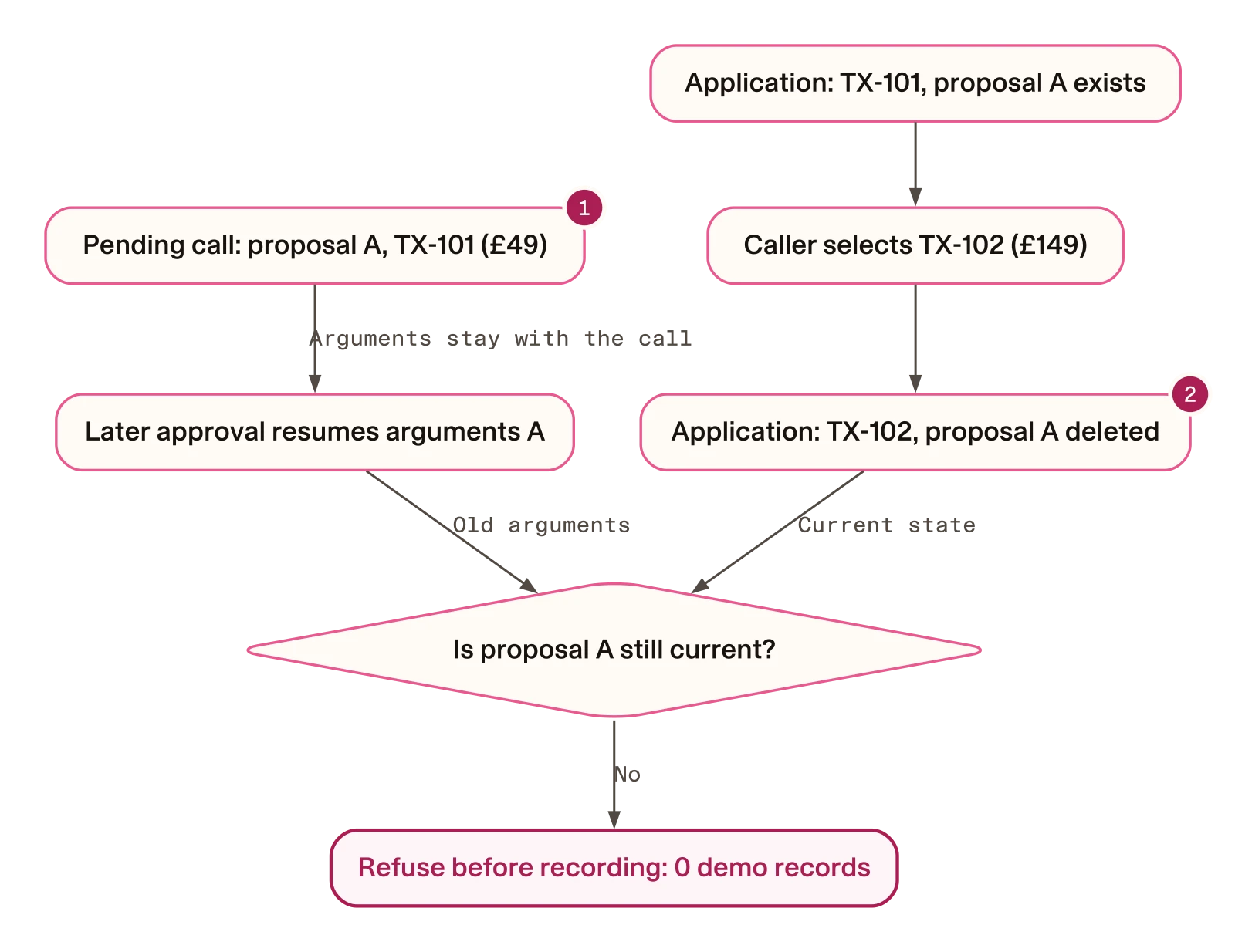
- The pending call still carries proposal A. Changing the selected charge does not rewrite its arguments.
- The application has invalidated proposal A. When the call resumes, the submission guard refuses it before creating a record.
The case service starts a selection change by clearing the earlier state:
def select(self, transaction_id):
    self.revision += 1
    self.proposal = None
    self.selected = None
# Check ownership before accepting the new selection.- Advance the revision. Any research still running for the earlier selection will be discarded when it returns.
- Remove the proposal. A pending submission can no longer find a current proposal matching its arguments.
- Clear the selection. If the requested charge fails the ownership check, the application cannot accidentally fall back to the previous one.
That last step is easy to overlook. A correction to an inaccessible charge still expresses a change in what the caller wants. Keeping the previous selection available would let later code reuse it accidentally.
Check the proposal and the details read back to the caller
At submission, the service first checks the proposal identifier and selected transaction. It then checks the merchant, amount, currency and date—the details used for the confirmation readback:
if (
    not self.proposal
    or proposal_id != self.proposal["proposal_id"]
    or self.selected != self.proposal["transaction_id"]
):
    return {"error": "proposal_changed_or_missing"}

if any(
    self.proposal[key] != value
    for key, value in (
        ("merchant", merchant),
        ("amount", amount),
        ("currency", currency),
        ("date", date),
    )
):
    return {"error": "readback_changed"}
The first refusal means the proposal is missing or no longer current. The second means the submitted details differ from the prepared proposal. For example, changing the amount causes readback_changed, even if the proposal identifier is correct.
These are excerpts; the companion contains the remaining selection and recording code. It also handles repeated submission of the same current proposal by returning the same demo reference. A repeated call therefore does not create a second record.
Prove which check prevents the wrong submission
The native correction test changes the charge and resumes the old call through Mantle’s actual invoker. With the guard present, it checks both the refusal and an empty record store.
A second, deliberately unsafe version removes only the two refusal checks from the Python method inside the test. It then repeats the same correction and later approval:
| Controlled run | Pending call describes | Current selection | Demo record |
|---|---|---|---|
| Guard present | TX-101, £49 | TX-102, £149 | None |
| Two refusal checks removed in the test | TX-101, £49 | TX-102, £149 | TX-102 |
Why does the unsafe version record TX-102? The remaining recording code uses the current selection, while the resumed arguments still describe TX-101. The confirmation gate permits execution, but it does not reconcile those states. The missing application checks would have caught the mismatch.
This controlled comparison uses synthetic state and a controlled tracker, with no provider calls or model conversation. The mutation exists only inside the test; keep both checks in the runnable service.
5. Run the offline checks
From the tutorial directory, run each suite with its intended interpreter:
mantle/.venv/bin/python -B -m unittest discover -s tests -p test_casework.py -v
mantle/.venv/bin/python -B -m unittest discover -s tests -p test_bridge.py -v
mantle/.venv/bin/python -B -m unittest discover -s tests -p test_mantle_native.py -v
worker/.venv/bin/python -B -m unittest discover -s tests -p test_worker_native.py -v
mantle/.venv/bin/python -B -m unittest discover -s tests -p test_replay_text.py -v
All five suites should finish with OK. An import error or skipped native suite means the relevant check has not run. In particular, use the worker interpreter for the Deep Agents suite and the Mantle interpreter for the Mantle gate.
These tests make no provider requests. The native tests exercise the installed frameworks with controlled model or tracker inputs, so you can inspect their behaviour without paying for a live conversation.
| Suite | What it checks | What remains to be evaluated elsewhere |
|---|---|---|
| Case state | Fixture ownership, proposal invalidation, changed readback and repeated submission | Production authentication and consent |
| Worker bridge | Snapshot transfer, credential allowlist, deadline cleanup and unchanged evidence | Operating-system isolation |
| Native Deep Agents graph | Real tool execution with a controlled model; absence of submission, shell and filesystem tools | Model accuracy and broader case coverage |
| Native Mantle gate | Same-turn refusal, denial, later approval and stale-call refusal | Full model dialogue and speech understanding |
| Replay reader | Tool-result checks, distinct receipt counting and rejection of invalid traces | Behaviour of a new live conversation |
Passing these checks gives you a foundation for the next stage: you know what the application should accept or reject. The live replay will test whether the conversation reaches those states in the right order.
6. Replay the conversation over text
Text testing lets you examine the model’s tool use before introducing microphone or speech-provider problems. Start with one approval case, inspect its trace, then try denial and correction.
Start the REST server
In the terminal containing your exported credentials, validate and train the Mantle project:
cd "$JACARANDA_EXAMPLE/mantle"
make validate
make train
make run
Validation must exit successfully, and training must create a model in models/. If either fails, check the licence and model configuration before starting the server. make run serves the REST channel on localhost; leave that terminal running.
Open a second terminal and check that the server is reachable:
curl --fail --silent http://127.0.0.1:5005/statusA successful JSON response confirms HTTP connectivity. It does not yet establish that research or submission works; the replay checks those next. If the connection is refused, wait for model loading to finish or inspect the server terminal. If port 5005 is occupied, use the existing server only if it is yours and runs this example.
Run one approval case
In the second terminal, change to the tutorial directory and run:
cd /absolute/path/to/jacaranda-voice/tutorials/deepagents-voice-disputes
python3 replay_text.py --case approval --out /tmp/jacaranda-approval.json
Replace /absolute/path/to with your clone’s location. The setup commands printed the full tutorial path in the first terminal.
The client sends four synthetic messages: a greeting, the demo code and charge, a request for staff review, and a confirmation. It checks tool results rather than treating the assistant’s wording as proof that a request was recorded.
Look for these transitions:
| Point in the conversation | Tool result | What it establishes |
|---|---|---|
| Research finishes | research_complete | Returned facts concern the selected charge |
| The caller requests review | prepared, then awaiting_confirmation | A proposal exists and submission is paused |
| The caller confirms in a later turn | demo_recorded with a DEMO- reference | A receipt identifies the recorded request |
A successful approval replay prints a JSON summary containing "case": "approval", "turns": 4, "recorded_results": 1 and "status": "passed". The receipt must identify the intended charge.
Exercise denial and correction
Use --case denial or --case correction with a different output path to try the other conversations. The cases check these outcomes:
| Case | Messages | Distinct receipts | Expected charge recorded |
|---|---|---|---|
approval | 4 | 1 | TX-101, £49 |
denial | 4 | 0 | None |
correction | 6 | 1 | TX-102, £149, after a fresh proposal and confirmation |
There is an important distinction between the correction replay and the stale-call test. The stale-call test proves that the old proposal records nothing. The complete correction conversation then prepares a new proposal and obtains fresh confirmation, so it should finish with one receipt for TX-102.
The replay counts distinct receipt identities because a resumed submission appears under both submit_review and its confirmation resolver in the tracker. Two result events can describe the same receipt. The reader rejects a wrong charge or a second receipt; its negative controls also reject a missing confirmation pause and a same-turn resolution error.
Inspect failures before rerunning
The server and worker use paid model calls, and one message can trigger several requests. If a replay fails, the client saves the incomplete trace and exits with an error. Inspect the last tool result and fix the cause before starting another run.
The client neither retries nor overwrites an existing trace. Choose a new output path for each fresh conversation. You can recheck an existing trace without a server or additional model calls:
python3 replay_text.py --case approval --read /tmp/jacaranda-approval.jsonThe output contains raw tracker data, so keep it local rather than committing or publishing it. A later model run may use different wording; the checks depend on tool ordering, charge identity and receipts.
The companion includes dated text runs for all three cases. Their provenance and limitations are explained in What the recorded evidence establishes. One successful run of each case is a useful example, not a reliability estimate. Use repeated user-task trials to assess dialogue behaviour.
7. Try the same workflow with voice
Return to the server terminal and stop your REST runtime with Ctrl-C. Start Inspector from the same Mantle directory, with the worker path, model key, licence and speech keys still exported:
cd "$JACARANDA_EXAMPLE/mantle"
make inspect
Retain the trained archive for the Inspector exercise. Both commands use port 5005, so do not run them together.
Open the local Inspector URL printed by the CLI, select voice and allow microphone access. The supplied configuration uses Deepgram Nova-3 for recognition and Rime Mist v3 with the ironwood speaker for synthesis. Interruptions are disabled in this setup.
Work through the same decisions you tested over text:
- Identify the fixture and charge. Use demo code
111111and ask about the 49-poundASTER*ANNUALcharge. The evidence should connect it to the fictional Aster Reading annual membership. - Decide whether that explains it. Tell the assistant whether you recognise the charge. If you still want staff review, request it.
- Respond to the separate confirmation. Confirm in a later turn and check that a reference is given only after the tool reports a recorded request.
- Try the alternatives. In separate conversations, deny the request or correct the charge before approval. A correction should lead to a new proposal and confirmation.
Listen for whether names and amounts are understood and whether the assistant’s readback is easy to follow. Keep spoken replies short enough for the caller to retain the details they are being asked to approve. If research times out, the assistant should offer staff review without inventing a finding.
The text tests cannot tell you how well this works with actual speech. Evaluate transcription, synthesis, accents and spoken corrections in the connected service. Interruption behaviour also needs its own configured audio tests before production; this exercise, with interruptions disabled, does not evaluate it.
Troubleshoot the step that failed
| Symptom | First check or next action |
|---|---|
research_not_configured | Check the absolute worker interpreter path and exported model key in the server terminal. |
| Research is unavailable | Check the worker lock, provider account, deadline and returned evidence format. |
proposal_changed_or_missing | Select the intended charge and prepare a new proposal after a correction. |
readback_changed | Submit the prepared merchant, amount, currency and date unchanged. |
| Voice will not connect | Check speech keys, the local Inspector, microphone permission and channel configuration. |
| Records disappear after restart | This is expected: the demo stores records in memory. |
What the recorded evidence establishes
The pinned verification record separates historical model runs from offline checks on the current source. That distinction matters when you compare a fresh run with the saved results.
The companion passed project validation and licensed training locally. A live Deep Agents smoke test read the synthetic transaction, descriptor and review policy. These establish that those particular runs completed; they do not measure a success rate.
The saved REST conversations date from 10 October 2026, with one recorded conversation per replay case. Both Mantle and the worker used pinned gpt-5.5-2026-04-23. Those runs preceded the rename of the second merchant. The current replay uses Larchwick Lodge for TX-102, and the renamed source has offline qualification. The dated traces are not live runs of that renamed source.
Two earlier failures are also retained because they explain changes to the example:
- Confirmation was requested before submission was paused. An earlier text run failed with that ordering. The revised skill establishes the pending call first, then asks for confirmation.
- One receipt was counted twice. The original approval trace retains an
incompletestatus from the earlier reader. The corrected reader passes the unchanged trace by counting distinct receipt identities. This was an offline parser recheck, not a new model run; the record retains both the original trace and corrected result.
The native graph tests check the tools exposed by this example, not every Deep Agents feature. Neither those tests nor the dated text runs measure speech quality or model reliability.
Apply the pattern beyond the demo
You now have a concrete division of responsibilities: the worker returns evidence, Mantle manages confirmation, and the case service checks that a resumed action still matches the current proposal. The correction scenario shows why each is needed. Research can become stale while it runs; a proposal can become stale while it waits for approval.
Keep the two-runtime design when an existing research workflow remains useful and Mantle should own its customer conversation. If you would rather move the task into one runtime, follow the Deep Agents SQL migration guide.
For a production implementation, the demo leaves several explicit responsibilities to address:
| Area | Work needed beyond this example |
|---|---|
| Identity and access | Replace fixture codes with trusted authentication and protect voice and direct application endpoints. |
| Case state | Persist case state and receipts in a durable service; expire sessions and proposals. |
| Consent | Record what was proposed and what the customer approved. |
| Provider operations | Set concurrency limits and data-retention policies; manage the worker lifecycle. |
| Evaluation | Use repeated user-task trials, real recordings and operational failure tests. |
Assign ownership as you implement those pieces: the application team owns the submission service, the conversation team owns the confirmation readback, and the platform team owns worker operations. Synthetic fixtures make the code inspectable; production evaluation must establish how it behaves with real users and failures.
Clean up the local environments
When you finish, stop your runtime and save any notes or traces you want to keep. From the resources repository root, retire the two installs created for this exercise:
python3 scripts/workspace.py retire tutorials/deepagents-voice-disputes/worker --owner jacaranda-worker --inactive
python3 scripts/workspace.py retire tutorials/deepagents-voice-disputes/mantle --owner jacaranda-mantle --inactive
Keep the manifests and lockfiles so the environments can be recreated. Avoid copying the installed environments into worktrees or backups.