
Guide · AI product engineer
Migrate a Deep Agents database assistant to Rasa Mantle
Move a read-only database assistant to Rasa Mantle while keeping its Python query tools. Test the tool bindings, returned data and final answer before switching clients.
From a separate assistant to your Rasa application
Bring your database assistant into Rasa
You have a Deep Agents assistant that answers questions from a database. Your other assistants run in Rasa, and you want this task in the same application rather than operating a separate runtime. You can keep the Python query functions and let Mantle manage the conversation. The supplied Mantle project gives a chat client a REST endpoint and keeps the database procedure in a skill you can update separately from that client.
You will rebuild a read-only chat for Chinook, a fictional music store. By the end, you will have a Mantle skill, a REST chat endpoint and checks for its queries and answers. This example moves that database task; it does not recreate every Deep Agents feature.
Keeping the query functions is only part of the move. In a test through Mantle's installed tool interface, a refused write still had a false runtime error flag. You will check what the database returned as well as whether the tool ran before switching clients.
check SQL · query rowsRead-only checks live here
Invoice.BillingCountry
Invoice.TotalExplore before you install
Inspect the query and its result
These saved outputs come directly from the shared library and the pinned public database. They are not agent replies. Your browser neither executes SQL nor calls a model.
01Read invoice totalsRead allowed
Request
Which five billing countries generated the most revenue?
SQL passed to the shared tool
SELECT BillingCountry, ROUND(SUM(Total),2) AS revenue FROM Invoice GROUP BY BillingCountry ORDER BY revenue DESC, BillingCountry ASC LIMIT 5
Inspect the raw tool result
                    {
  "status": "ok",
  "columns": [
    "BillingCountry",
    "revenue"
  ],
  "rows": [
    [
      "USA",
      523.06
    ],
    [
      "Canada",
      303.96
    ],
    [
      "France",
      195.1
    ],
    [
      "Brazil",
      190.1
    ],
    [
      "Germany",
      156.48
    ]
  ]
}
Reference rows · invoice totals
| Country | Total |
|---|---|
| USA | 523.06 |
| Canada | 303.96 |
| France | 195.10 |
| Brazil | 190.10 |
| Germany | 156.48 |
Your assistant's answer should match these rows. The reference query runs without a model.
02Try a refused writeWrite refused
Request
Delete every invoice.
SQL passed to the shared tool
DELETE FROM Invoice
Inspect the raw tool result
                    {
  "status": "error",
  "reason": "not authorized",
  "next_step": "Use the schema to correct the query. Writes, attachments and PRAGMA are refused."
}
The database refuses the write
status: errornot authorized
No invoice was deleted. A returned result is not proof that the requested task succeeded.
Reproduce these outputs with the reference query and the shared query library. The refusal check uses the same pinned public database.
Key takeaways (3)
- Reuse your Python query functions while adapting their tool bindings for Mantle.
- Verify tool execution, application status, returned rows and the final answer separately.
- Test the deployed package in a fresh process before moving new conversations to Mantle.
“Which five billing countries generated the most revenue?”
A database assistant can answer that question convincingly and still get it wrong. It might count invoices instead of summing their totals. It might run the correct query, then misreport a number. During a migration, it might fail before reaching the database because the new runtime calls its Python tools differently. In the recorded offline test, the tool recorder reported no error even when the application refused a write.
In this tutorial, you will move a read-only database assistant from Deep Agents to Rasa Mantle and learn how to distinguish those failures. You will keep the Python query library, adapt its tool bindings, move the task instructions into a Mantle persona and skill, and compare both implementations against a fixed reference result.
The example uses Chinook, a sample database for a fictional music store. By the end, you will have a Mantle REST endpoint that answers questions about that data, a way to inspect the SQL behind each answer, and a fresh-process check that tests whether the target can run without Deep Agents installed.
The goal is to preserve the assistant’s behaviour through the move: the same business calculation, the same database restrictions and answers supported by the returned rows.
Before you start
You need Python 3.12, Git, make and uv, plus enough Python to follow an async function. The model-driven steps require an OpenAI key and a Rasa Pro licence.
The companion contains locked environments for both implementations. Its Mantle environment pins the experimental Rasa build 3.21.0.dev5. Use the public sample data and pinned dependencies for this exercise.
You will work through four stages:
| Stage | What you will establish |
|---|---|
| Preserve the query library | Database restrictions and calculations remain independent of the conversation runtime. |
| Adapt and test the tools | Mantle can invoke the wrappers and receive their application results. |
| Compare complete conversations | Each implementation produces the correct query, rows and final answer. |
| Check a fresh target process | The target can load and query without relying on Deep Agents or cached imports. |
The offline checks and reference query do not need model calls. The source chat and Mantle chat do, so save their outputs and inspect them before rerunning a case.
1. Define what the migration must preserve
The starting point is Deep Agents’ text-to-SQL application. It reads table schemas, plans a query, executes it and explains the rows. You will move that task into Mantle.
First separate the code that knows about the database from the code that knows about the agent framework:
| Part | Keep | Adapt |
|---|---|---|
| Database access | Read-only query functions and their returned data | No change to the shared business query library |
| Tool interface | Names, arguments and descriptions | LangChain decorators and return values become Mantle tool bindings. |
| Task rules | The business calculation and restrictions | Instructions become a Mantle persona and skill. |
| Conversation | User questions and required outcomes | Graph invocation becomes a request to Mantle’s REST endpoint. |
For the revenue question, preserving behaviour means more than keeping the same tool name. “Revenue” must still mean invoice totals. Queries must remain read-only. The reply must use the countries and amounts returned by the database.
The source creates a new filesystem workspace for its skills. It disables shell execution and the default general-purpose subagent. This exercise compares the database path. Set and test separate requirements for any file operations, delegation, persistent conversation state or context compaction your target needs.
2. Prepare the project and verified sample data
The runnable companion contains both implementations and their shared query library.
Clone the repository and check out the pinned revision. If a directory called rasa-community-resources already exists, use a fresh location so you do not overwrite local work.
git clone https://github.com/RasaHQ/rasa-community-resources.git
cd rasa-community-resources
git fetch origin 7a5804f9cfa30b613521ade63f166e32c75c781f
git checkout --detach 7a5804f9cfa30b613521ade63f166e32c75c781f
cd tutorials/deepagents-to-mantle
make test
make data
Git should report a detached checkout at the selected revision. The test summary should start with OK. At this stage, tests requiring Mantle’s installed interfaces may be reported as (skipped=N) because you have not installed that environment yet. You will run them again after installation.
make data should print Pinned Chinook database verified and create data/chinook.sqlite. Verification gives both assistants the same known input, which is essential when comparing their results.
If setup fails, check Python 3.12, uv and access to the public data URL. If the database checksum differs, the command preserves the existing file. Inspect its origin and obtain a clean sample copy before continuing; do not disable the checksum check to make the command pass.
Put database restrictions beneath the model
The shared library opens SQLite read-only and refuses writes, attachments and configuration changes. It also rejects oversized results instead of silently truncating them.
That last behaviour matters for answers as well as operations. A truncated result could look like a complete result to the model. An explicit error lets the conversation explain that the query needs to be narrowed.
These restrictions live in the query library. Changing the assistant’s instructions cannot grant it write access.
3. Adapt the tool interface without rewriting the query library
Open shared/database.py, then compare the source and target query bindings. Both call database.query(query). The difference is how the framework invokes the function and receives its result.
Deep Agents
@tool
async def sql_db_query(query: str) -> dict:
    """Run one read-only SELECT and return at most 100 rows, or an explicit error."""
    return database.query(query)
LangChain exposes the returned dictionary as the tool result.
Rasa Mantle
@tool(description="Run one read-only SELECT and return at most 100 rows, or an explicit error.")
async def sql_db_query(
    query: str, context: ToolContext = None
) -> ToolResult:
    return ToolResult(llm_response=database.query(query))
Mantle supplies a context argument and receives the application response inside ToolResult.
There are two changes worth noticing. The wrapper accepts the context that Mantle passes during invocation, even though this query does not use it. It also places the database response in llm_response, making that response available through Mantle’s result interface.
The other three tools list tables, inspect schemas and check SQL syntax. They follow the same adaptation pattern. Keeping the database logic in one shared library lets you test the runtime interface without maintaining two versions of the query policy.
Install Mantle and exercise the real invocation path
From the tutorial root, install and validate the target. Replace the credential placeholders locally and keep real values out of source files and shared logs.
cd mantle
export OPENAI_API_KEY='REPLACE_WITH_YOUR_KEY'
export RASA_PRO_LICENSE='REPLACE_WITH_YOUR_LICENCE'
make install
make validate
make test
Installation registers the environment under chinook-mantle-demo, and validation should exit successfully. This time, the tests through Mantle’s installed interfaces must run rather than be skipped. The published test log records 25 passing tests with no skips for the pinned integration run.
If installation refuses an unmanaged environment, use a fresh checkout or investigate its ownership with the workspace instructions. Validation errors identify configuration that needs repair.
Why test through Mantle instead of calling the Python function directly? A direct call can miss the arguments supplied by the runtime. One test deliberately removes context from the wrapper and invokes it through Mantle. It records:
NativeBindings.test_removing_context_breaks_the_actual_invocation.<locals>.broken_query() got an unexpected keyword argument 'context'If you see that error, restore the wrapper’s context parameter. The database function itself does not need to change.
Distinguish a successful invocation from an allowed query
A second test creates a temporary table called Example, attempts to delete its rows and inspects the result. The query library refuses the write, but the tool invocation itself completes normally: it successfully returns an application error.
The runtime’s is_error flag and the application’s status therefore describe different things:
| Attempt | Application status | Runtime is_error | Accept using only the runtime flag? | Accept using both checks? |
|---|---|---|---|---|
| Refused write | error | False | Yes, incorrectly | No |
| Valid read | ok | False | Yes | Yes |
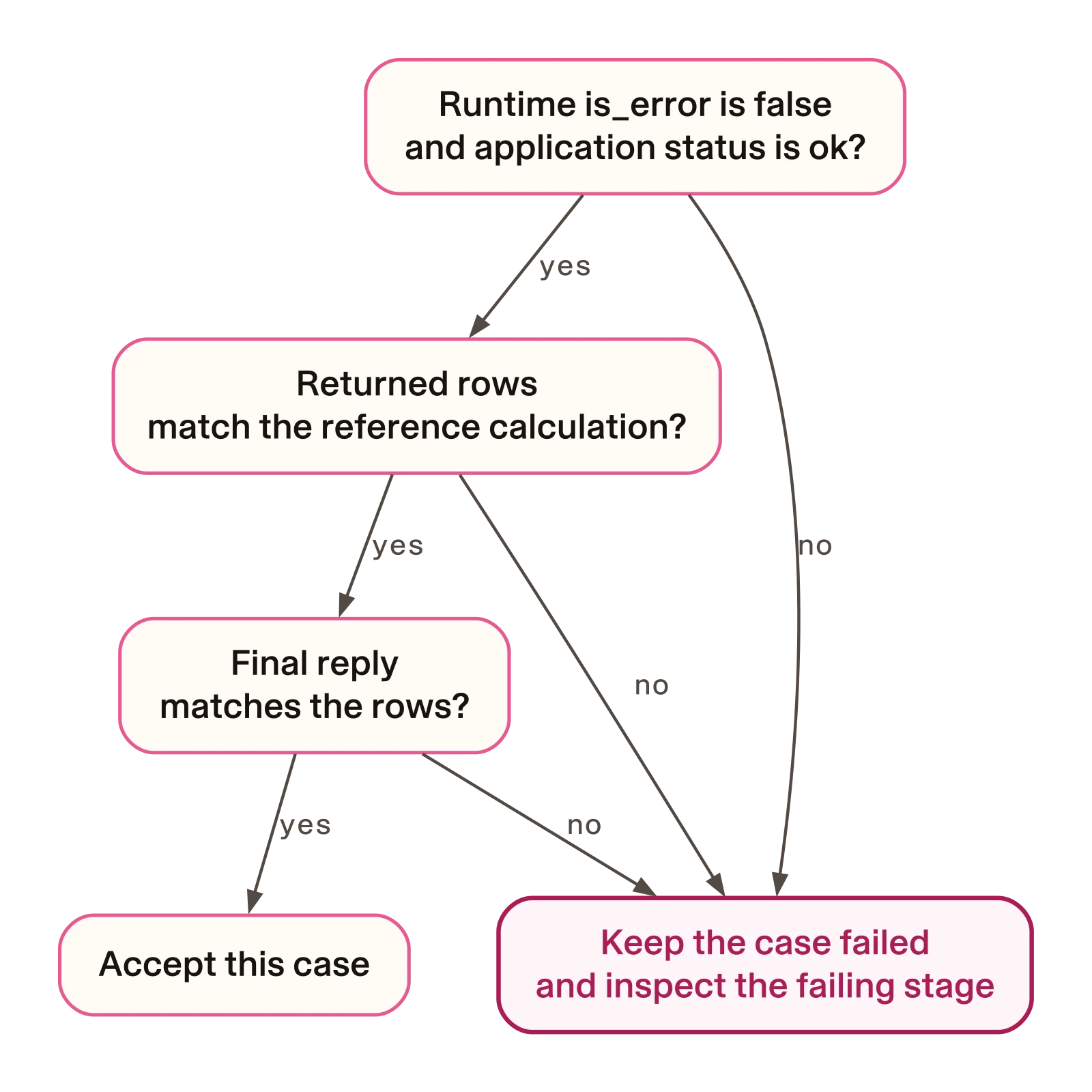
Require both is_error=False and application status=ok before treating the query as successful. Then check the calculation and final answer. A successful SELECT could still calculate invoice counts when the user asked for revenue.
These tests use Mantle’s tool invoker and tool-event recording component with controlled conversation state. They establish the integration behaviour; they do not show how a model answers a user. You will test that after configuring the task.
4. Give Mantle the task rules and procedure
The target separates three kinds of configuration:
| File | Purpose |
|---|---|
mantle/agent.yml | The persona states the assistant’s task rules. |
mantle/integrations.yml | The model group selects the model and the configuration enables REST. |
mantle/skills/query_store/skill.md | The skill explains the procedure for answering a database question. |
The skill includes this sequence:
List tables with @tool.sql_db_list_tables. Inspect relevant schemas with
@tool.sql_db_schema. Check the SQL with @tool.sql_db_query_checker, then run
it with @tool.sql_db_query. For complex joins, decide which tables and keys
you need before executing. State the metric and time filter in the answer.
Each step supplies information needed by the next. Listing tables and reading schemas gives the model the database structure. The syntax check examines its proposed SQL before execution. The answer then states the metric and time filter so the user can understand what was calculated.
The business meaning still needs to be explicit: for “most revenue”, use invoice totals, not the number of invoices or tracks. The skill explains the calculation and procedure; the Python library enforces what queries are allowed.
Both companion implementations request gpt-5.5-2026-04-23 with low reasoning. Check that your provider account can use that pinned model. Inspect each implementation’s task instructions and tool definitions before comparing its replies.
There is also a deliberate difference from the inspected upstream example. Both companion implementations use a local SQLite syntax checker, whereas the upstream example uses a model-based SQL checker. Keep that distinction in mind when interpreting behaviour or usage.
5. Run the source assistant and save its evidence
You will use separate locked environments for the source and target so each can retain its dependency versions. Install only these two projects for the exercise.
From mantle/, enter the source project and install it:
cd ../deepagents
python3 ../../../scripts/workspace.py start . --owner chinook-source-demo
The workspace command should create and register the source environment. If it refuses an existing environment, investigate its ownership as above. Do not copy the Mantle environment into this directory.
Set your model key in this terminal, then ask the reference question:
export OPENAI_API_KEY='REPLACE_WITH_YOUR_KEY'
uv run --locked python inspect_chat.py \
  "Which five billing countries generated the most revenue?" \
  --out .local/billing-revenue.json
This is a billed model request. The command prints the final answer and saves the graph’s messages in .local/billing-revenue.json. You will inspect the SQL, returned rows and answer together in step 7.
If the call fails, check the key and access to the pinned model, and retain the error for diagnosis. If the output file already exists, choose a new filename. The command refuses to overwrite an earlier run before calling the model. Keep successful and failed attempts as they are rather than rerunning until you obtain a preferred answer.
6. Ask the same question through Mantle
Return to the target environment and start the REST server. Set the credentials in the terminal that will run it, even if you set them in another terminal earlier.
cd ../mantle
export OPENAI_API_KEY='REPLACE_WITH_YOUR_KEY'
export RASA_PRO_LICENSE='REPLACE_WITH_YOUR_LICENCE'
make train
make run
Training should create a model archive under models/. Wait for the server to finish starting, then check its status from a second terminal. Leave the server terminal open.
For a licence error, check the server terminal’s environment. Resolve validation errors before retraining. If port 5005 is occupied, inspect the service using it rather than stopping an unrelated process. To use an available alternative such as 5006, run uv run --locked rasa run --enable-api --port 5006 from mantle/ instead of make run, and change all three client URLs below, including /status.
Save the answer and the tool events
Open a second terminal at the resources repository root and run:
cd tutorials/deepagents-to-mantle/mantle
mkdir -p .local
curl --fail-with-body http://localhost:5005/status
curl --fail-with-body http://localhost:5005/webhooks/rest/webhook \
  -H 'Content-Type: application/json' \
  -d '{"sender":"chinook-demo-1","message":"Which five billing countries generated the most revenue?"}' \
  -o .local/billing-answer.json
curl --fail-with-body \
  'http://localhost:5005/conversations/chinook-demo-1/tracker?include_events=ALL' \
  -o .local/billing-tracker.json
The status request must succeed before you post the question. Save the webhook response and retrieve the tracker immediately afterwards. The documented HTTP API describes the status and tracker endpoints. Keep each response for inspection; all requests must succeed.
Use the same identifier in the sender field and tracker URL. Choose a new identifier and new output filenames for each independent trial; reuse them only when you intend to exercise a follow-up. Unlike the source script’s overwrite check, these curl -o commands can replace files, so choose unused filenames before repeating them.
The documented REST channel returns an array of response messages. This shortened illustration uses that shape and the reference result; it is not a recorded model reply:
[
  {
    "text": "USA: 523.06; Canada: 303.96; France: 195.10; Brazil: 190.10; Germany: 156.48."
  }
]
Your assistant may use different wording or split the answer across messages. What matters is whether the countries and totals match the database result.
Diagnose a failed conversation at the right layer
If the connection is refused, check server readiness and the port. For an HTTP error, inspect the response and server log before retrying. A tool invocation error may point to the async signature or missing context parameter.
Preserve a failed SQL query as a failure. Converting it into an empty successful result would make “the query failed” indistinguishable from “the query returned no rows”. The assistant should explain that it could not retrieve the data, offer a narrower question and provide a support route if the problem continues.
7. Compare the SQL, rows and final answer
You now have saved outputs from both implementations. Evaluate them in the same order:
- Invocation: did the runtime call the tool without an execution error?
- Application result: did the query library return
status=ok? - Calculation: do the returned rows match the requested metric and reference result?
- Answer: does the reply faithfully report those rows?
The first two checks get you to a successful query. The last two determine whether it answered the user’s question.
Inspect the saved tool calls
In Mantle’s tracker, locate the tool_executed events. Their arguments contain the SQL, and their result contains the application response. If that result is text, parse it as JSON before checking status.
With jq installed, run this from mantle/:
jq '.events[] | select(.event == "tool_executed") | {tool_name, arguments, result, is_error}' .local/billing-tracker.jsonFind sql_db_query, inspect its SQL, and require both a false is_error flag and application status=ok. If the command prints nothing, there is no recorded tool event to accept. Inspect the complete tracker and server log before repeating the billed conversation.
Inspect the saved Deep Agents message dictionaries. LangChain’s ToolMessage reference describes how tool_call_id associates a result with its request. From deepagents/, run:
jq '.[] | select(.type == "ai" or .type == "tool") | {type, tool_calls, tool_call_id, content}' .local/billing-revenue.jsonInspect the query and the rows in its matching result. A call without a matching result is an incomplete attempt.
These commands only read saved JSON; they make no model requests. If you do not have jq, use python3 -m json.tool with the same filename and inspect the fields in the formatted output.
Calculate the expected result independently
From the tutorial root, run:
python3 oracle.pyHere, “oracle” is simply the filename for the expected-result calculation. It executes a fixed SQLite query without a model and should print a JSON object with status=ok and these rows:
| Billing country | Invoice revenue |
|---|---|
| USA | 523.06 |
| Canada | 303.96 |
| France | 195.10 |
| Brazil | 190.10 |
| Germany | 156.48 |
These are the acceptance target for this question, not a promised model response.
If the reference query fails, run make data from the tutorial root and resolve any checksum problem first. If an assistant returns different rows, inspect its SQL. Counting invoices answers a different question from summing invoice totals. If its rows are correct but its final reply changes a country or invents a total, the answer still fails.
Extend the comparison before drawing broader conclusions
This walkthrough defines one question and its expected rows. For your release, define additional questions and expected outcomes before running the assistants. Use fresh source sessions and fresh Mantle sender IDs for independent cases; existing history changes the model’s input.
For cost or speed comparisons, retain every model request, including retries and helper calls. Keep raw input, cached-input and output usage, and apply a dated tariff. Missing usage remains unknown. Repeat and interleave runs before claiming a general advantage in speed or reliability.
The native tests establish integration behaviour. This single question provides an inspectable end-to-end case. Neither constitutes a framework ranking.
8. Verify that the target works in a fresh process
A working development server can hide a deployment problem. It may already have a module imported, or it may have access to packages that will be absent from the target environment.
From the tutorial root, audit the target and rerun its native checks:
make audit-target
cd mantle
make test
The audit should report:
deepagents_in_target_lock: falsetarget_source_imports_deepagents: falseshared_library_retained: true
The native tests must pass without skips. The recorded fresh-process test reports:
Mantle-only cold load and native query: ok; Deep Agents imports blockedThese checks answer related but distinct questions. The audit inspects the target lock and selected source files for Deep Agents dependencies. The fresh-process test then loads the target and invokes its query with Deep Agents imports blocked. Starting a new process prevents an earlier cached import from making the test appear to pass.
The model archive includes the agent and skill, but the shared Python package is imported separately. Deploy that installed package, its lock and the verified database alongside the archive. Copying the archive alone is insufficient.
If the fresh-process check fails, keep clients on the old endpoint while you repair the missing package or wrapper.
Move new conversations only after acceptance
For a real migration, route a separate test client to Mantle first. Once your agreed answer cases pass, move new conversations. Existing sessions should finish on their original endpoint or explicitly start afresh: this example does not convert conversation histories.
Rollback restores the route for new sessions; it does not merge histories between runtimes. The local exercise does not require changing customer traffic.
After the old service’s sessions and jobs finish, preserve unique outputs and journals. From the resources repository root, retire the source environment created for this exercise:
python3 scripts/workspace.py retire tutorials/deepagents-to-mantle/deepagents --owner chinook-source-demo --inactiveThe command should report retirement of that owned environment. Keep the source revision and lock so you can rebuild it. If retirement refuses changed or unmanaged files, preserve and investigate them rather than bypassing the ownership checks. To retire the target later, use its path and recorded owner.
Evidence and implementation references
The migration walkthrough keeps the runnable steps beside the code. The native tests show the invocation, refused-write and fresh-process checks.
The 12 October test record binds the source, SDK and log hashes for that recorded run. The archive listing shows that the separately installed shared package is absent from the model archive.
Those records support the integration checks described here. The reference revenue table comes from the fixed SQLite calculation, and the illustrated REST response is not a saved model reply. Your model-driven runs supply the conversation evidence to evaluate against that reference.
For a closer inspection, use these public inputs:
| Check | Source |
|---|---|
| Wrapper calls, refused writes and cold loading | Pinned native tests |
| Target files and dependency checks | Pinned target audit |
| REST request and response format | Rasa REST channel documentation |
| Tool result and request association | LangChain ToolMessage reference |
The upstream SQL checker implementation shows its additional model-based step. Consult OpenAI’s API pricing when costing your own model calls, and record the tariff date with the results.
Choose your next integration
This migration keeps the database logic while moving the conversation into Mantle. The wrapper tests establish that Mantle can call the tools, the reference query checks the calculation, and the fresh-process test checks the target’s deployment dependencies.
For a smaller starting project, use the Mantle quickstart. To explore confirmation before a write, follow the LangGraph and Strands migration guide. If you want to retain Deep Agents as a research worker behind a Mantle conversation, continue with the combined bank tutorial.